Notice Informational Guide: Not affiliated with Gov.
📲
mParivahan NextGen Official Logo
✓ Official Mobile App

mParivahan NextGen: Official App Download & Virtual DL/RC Guide (एमपरिवहन ऐप डाउनलोड एवं वर्चुअल डीएल/आरसी मार्गदर्शिका)

Your digital driving license and vehicle registration (RC) are now just a tap away. Legally valid across India under the IT Act.

✓ Legal Status Verified Information Technology Act 2000

Under Section 4 of the IT Act, digital Driving Licenses (DL) and Registration Certificates (RC) displayed inside the official mParivahan app are legally equivalent to their physical plastic counterparts and must be honored by all traffic police checkpoints across India.

Why use mParivahan NextGen?

Developed by the National Informatics Centre (NIC), mParivahan is the citizen-centric app for transport services. It allows you to carry your Virtual DL and RC on your smartphone, eliminating the need to carry physical documents.

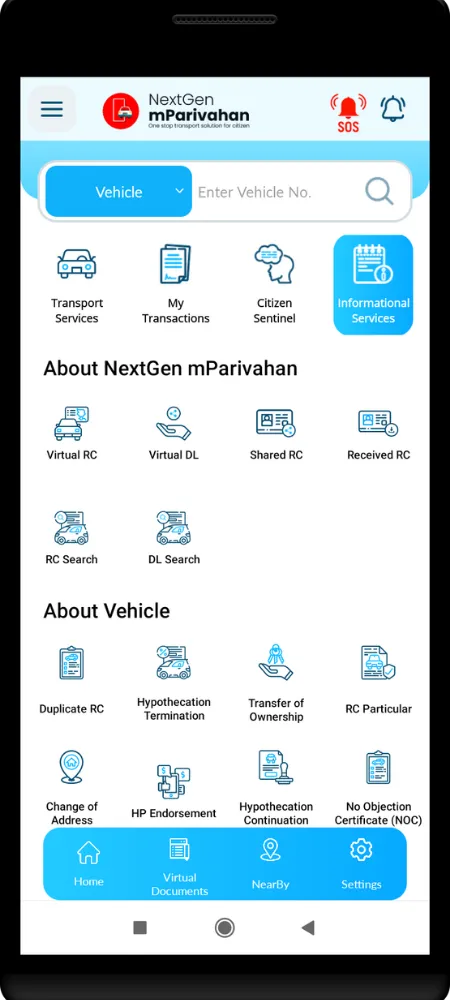
Virtual DL & RC

Generate legally valid digital copies of your documents via the Sarathi backend that can be shown to traffic police during verification.

Vehicle Search

Instantly check owner details, registration date, fuel type, and insurance validity of any vehicle in India.

Pay Challans

Track pending eChallans and pay them directly through the app using multiple payment gateways.

Emergency Help

Quick access to roadside assistance and emergency helpline numbers in case of accidents or breakdowns.

Android App Specifications & Key Features (एंड्रॉइड ऐप विवरण)

Specification / Feature Details & Android Capabilities
Official Package Name com.nic.mparivahan
Minimum Android Version Android 5.0 (Lollipop) or higher
App Sizing & Memory ~24 MB (varies slightly by smartphone vendor)
Biometric Protection Yes — Native fingerprint sensor & custom 4-digit MPIN block
Offline Dashboard Storage Supported — Access virtual DL/RC QR codes offline
Challan Settlement Direct integrated payment gateway for all Indian States

iOS App Specifications & Key Features (आईओएस ऐप विवरण)

Specification / Feature Details & iOS Capabilities
Official Apple Store Link ID id1189196580 (NIC mParivahan)
Minimum iOS Version iOS 12.0 or later (Compatible with iPhone & iPad)
App Size ~38.5 MB
Face ID & Touch ID Integration Supported — Quick unlock via biometric prompt
Dynamic QR Code Refresh Generates encrypted, time-sensitive virtual codes for RTO checkpoints
Apple Wallet Compatibility Planned — Documents hosted inside mParivahan sandboxing

How to Create Virtual DL in App?

1

Download & Register

Download mParivahan and sign up using your mobile number and Aadhaar.

2

Enter DL Number

Select "My Virtual DL" and enter your driving license number and DOB.

3

OTP Verification

Verify the request using the OTP sent to your Aadhaar-linked mobile number.

4

Access Dashboard

Once verified, your DL will be visible on the home dashboard even when offline.

Legality Note: As per the MoRTH notification and Information Technology Act 2000, digital documents on mParivahan are acceptable on par with original physical documents.

App Stats 📈

Downloads 50M+
Rating 4.1 ⭐
Developer NIC, Govt of India

mParivahan Expert FAQ

Is mParivahan virtual DL valid for police verification?

Yes, under Section 4 of the Information Technology Act 2000 and notifications from the Ministry of Road Transport and Highways (MoRTH), a virtual driving license stored in mParivahan or DigiLocker is legally valid and must be accepted by traffic police.

How to add a RC to mParivahan?

Open the mParivahan app, log in, select "My Virtual RC," enter your Registration Number, and then enter the last 5 digits of your chassis and engine numbers. Click "Add to Dashboard" to generate the virtual RC.

What is mParivahan NextGen?

mParivahan NextGen is the upgraded, high-performance version of the original transport app, featuring faster OTP logins, unified vehicle searches, and mParivahan mTransaction features for paying taxes and challans.

Why is my virtual DL not showing on mParivahan?

This usually happens if your driving license is not yet digitized in the national Sarathi database, or if the name/DOB on your license does not match your mobile registration. Contact your local RTO to update your data.

Was this RTO guide helpful?